
Digital business cards for teams and companies: brand consistency without managing person by person
How to give a digital card to an entire team without each person making their own: corporate profiles, onboarding and offboarding, bulk import, custom domain, and leads that flow into your CRM automatically.
July 13, 2026
7 min read
1 views

AI Summary
How to give a digital card to an entire team without each person making their own: corporate profiles, onboarding and offboarding, bulk import, custom domain, and leads that flow into your CRM automatically.
When a digital business card is distributed among thirty salespeople without a central corporate profile, the problem is not aesthetic: it's that no one can guarantee all thirty say the same thing, and when the logo, address, or main phone number changes, there's no way to update them all at once. The solution is not to ask each person to carefully edit their card. It's to separate what belongs to the company from what belongs to the person, and have the company information defined once and propagate itself automatically.
This article is not for someone who will carry their own card in their pocket. It's for whoever makes the decision to give a digital card to a team: what gets controlled from the top, what stays in each person's hands, and what happens the day someone joins or leaves.
The real problem isn't the card, it's consistency
Without central control, each team member builds their card however they want. One uploads the logo in low resolution, another uses an old address, a third chooses a color that isn't the brand color. None of this is malicious: it's just that no one gave that person the correct data, or an easy way to keep it up to date. The result is thirty different versions of the same company circulating among clients, and neither marketing nor anyone else has a way to correct them all at once.
With paper, the problem is invisible because there's nothing to update: the print run was made and that's it. With a digital card without a corporate profile backing it, the problem doesn't disappear — it shifts from being a printing error to an error that persists indefinitely, because no one touches their card again once it's set up.
Corporate profiles: company data is defined once
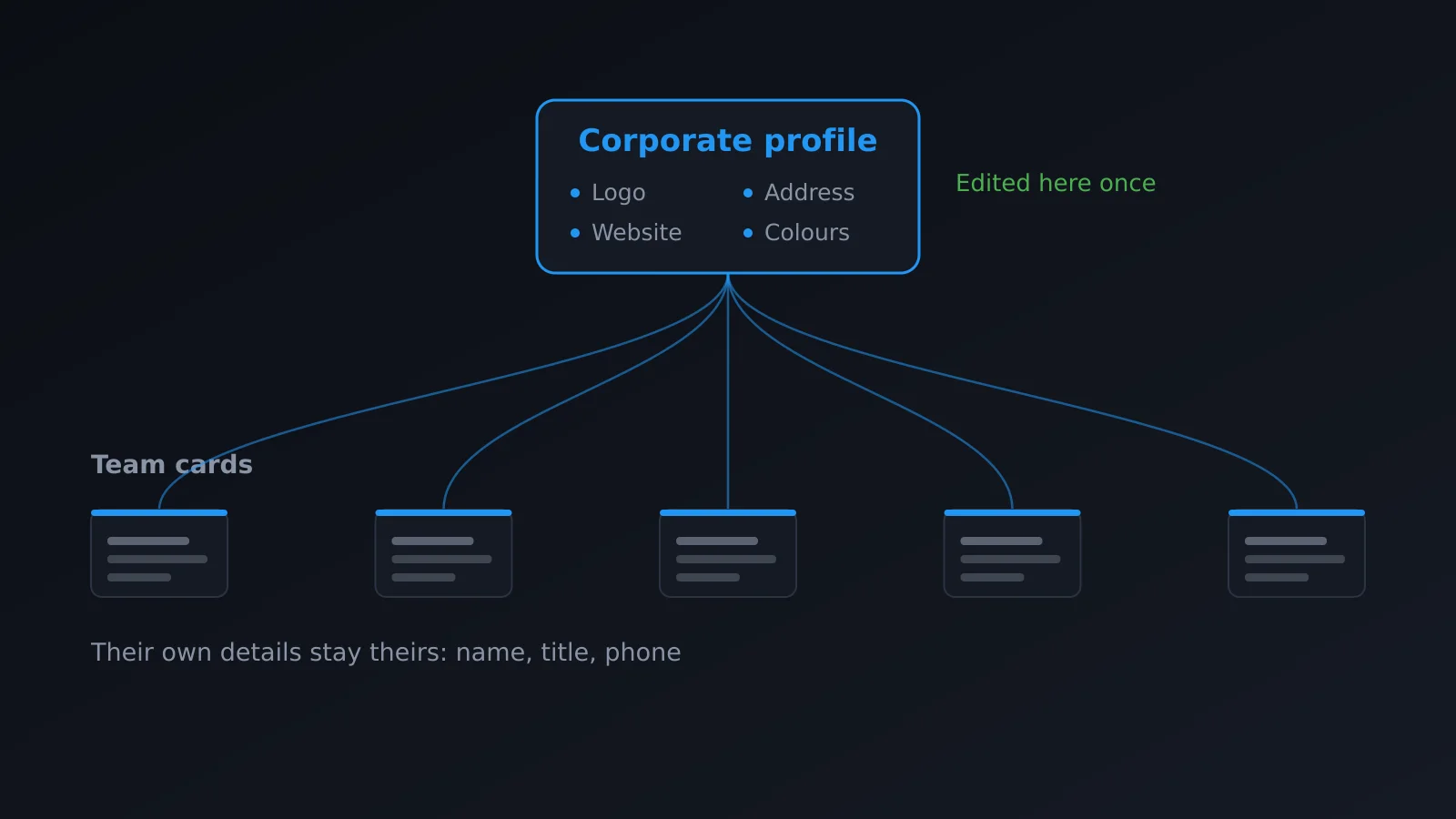
A corporate profile groups what belongs to the company — logo, brand colors, address, domain — in one single place. Team members' cards link to that profile instead of having those data copied one by one. When something changes at the company level, you edit the profile once and the change propagates automatically to all cards that reference it.
Each team member still has their own card and still controls what is theirs: name, title, extension, photo, personal social media. What they stop controlling — because they shouldn't — is the company logo or the office address. Without this separation, a change of address means going card by card to edit the same field thirty times; with a corporate profile it's one edit that happens once and appears on all linked cards the next time someone visits them.
Onboarding and offboarding: the card follows the position, not the person indefinitely
When someone new joins the team, their card works on day one, with the correct logo, colors, and address from minute one, because they inherit the corporate profile. No one needs to explain which shade of blue to use.
When someone leaves the company, their card is deactivated and stops representing it. This is what truly sets a managed digital card apart from a paper card: with paper, that person can keep boxes of cards with your logo and phone number in a drawer, and keep handing them out — without malicious intent, simply because no one collected them — for years after leaving. With a digital card that deactivates from the company's admin panel, that risk disappears the same day the offboarding is processed.
Bulk import: onboard an entire team at once, not person by person
Setting up cards one by one makes sense for two or three people, not for a twenty-person sales team or an entire staff on the day the company adopts digital cards all at once. Bulk import lets you onboard an entire team at once, instead of repeating the same form twenty or thirty times — up to 500 cards per import, with a request limit to prevent system abuse. This matters most in two moments: initial deployment and large additions, like a new office or absorbing another team.
Team dashboard: know which cards are actually being used
Onboarding thirty cards doesn't guarantee all thirty get used. A team dashboard lets you see, from a single screen, which cards have real activity and which haven't had a scan in months — something that's impossible to know with paper cards.
With a centralized dashboard, whoever manages the team can detect who isn't using the tool instead of discovering it a year later when reviewing results.
Custom domain: brand control, not aesthetics
Having all your team's cards live under your own domain, instead of a provider's domain, isn't a matter of taste. It's a matter of who controls the address that appears in every QR you hand out, in every email signature, and in every card printed with NFC. If the domain is the provider's, the brand being reinforced with each scan is the provider's, not yours. If it's your own domain, the link itself becomes part of your company identity.
Leads from the team go into the CRM, not thirty different spreadsheets
When each salesperson manages their contacts on their own, the leads captured by each card end up on that person's phone, in a note, or at best in a spreadsheet no one else sees. Webhook integration allows leads captured by any team member to arrive automatically in the company's CRM, at the moment they're captured, without depending on each person exporting and passing them manually.
Cost structure: recurring and editable versus one-time and frozen
A print run of paper cards for thirty people is a one-time expense that freezes at the moment of printing. If an address changes, new people join, or the logo updates, the entire run becomes obsolete and you have to reorder, with the cost and wait that entails, and old boxes circulating in the meantime.
A team subscription is a recurring expense, but editable at any time without additional production cost: an address change is edited in the corporate profile and applies instantly, without reprinting anything or waiting for an order to arrive.
| Paper | Team digital card | |
|---|---|---|
| When company data changes | Entire print run becomes obsolete | Edit corporate profile once |
| New person onboarded | Wait for next print order | Card active same day |
| Person leaves | Their physical cards keep circulating | Deactivate from dashboard |
| Onboard entire team | Large order, same design for all | Bulk import, individual data per person |
| Leads captured | Don't exist without manual intervention | Flow into CRM via webhook |
| Nature of expense | One-time, frozen until next print run | Recurring, editable at no extra cost |
Frequently asked questions
How many people can fit in a team?
The Enterprise plan allows up to 10 seats per team. For larger needs, this should be evaluated case by case with the support team.
What happens to someone's card when they leave the company?
It's deactivated from the team's management dashboard. It stops being active and representing the company, unlike paper cards that person might keep.
Can I use my own domain for the team's cards?
Yes. The Enterprise plan includes custom domains, so all your team's cards live under your company's address instead of a third-party domain.
Do leads captured by team cards go into our CRM?
Yes, through webhooks. Each lead captured by any team card is automatically sent to the system you already use, without manual exports.
Do I need to set up each card by hand when onboarding a team?
No. Bulk import lets you onboard up to 500 cards in a single operation, instead of repeating the process person by person.
In summary
Giving a digital card to a team without a corporate profile is delegating brand consistency to each person's memory, and that doesn't work beyond the third or fourth person. With corporate profiles, onboarding and offboarding managed from a dashboard, bulk import, custom domain, and leads flowing directly into your CRM, the brand is controlled from one place and each person only manages what's truly theirs.
Compare what your team needs on the pricing page, and if you want to see the rest of the Enterprise plan features, they're detailed in features. If you're still deciding whether your team needs a digital card, what is a digital business card might help, or if the focus is B2B sales, digital card for B2B salespeople.