Digital business card for B2B sales teams: from handshake to CRM
How a B2B sales team uses a digital card: the lead enters the CRM without manual transcription, analytics alerts you when a prospect views your card again, and widgets shorten the sales cycle. What it doesn't solve, plainly put.
July 13, 2026
8 min read
0 views
AI Summary
How a B2B sales team uses a digital card: the lead enters the CRM without manual transcription, analytics alerts you when a prospect views your card again, and widgets shorten the sales cycle. What it doesn't solve, plainly put.
For a B2B sales team, a digital card is worth what happens after the handshake: the lead can enter the CRM without anyone transcribing a paper card, analytics alerts you when a prospect opens your card again weeks later, and the catalog or booking link travels within the same link you're already sharing. It doesn't close deals on its own — the sales rep still does that. It eliminates friction and data loss between the visit or trade show and the system where your pipeline actually lives.
The B2B sales cycle rarely closes in the meeting itself. It closes weeks or months later, after multiple touchpoints, and that's where paper fails: it leaves no trace.
The problem isn't the card, it's the follow-up
What really happens at a trade show or sales visit
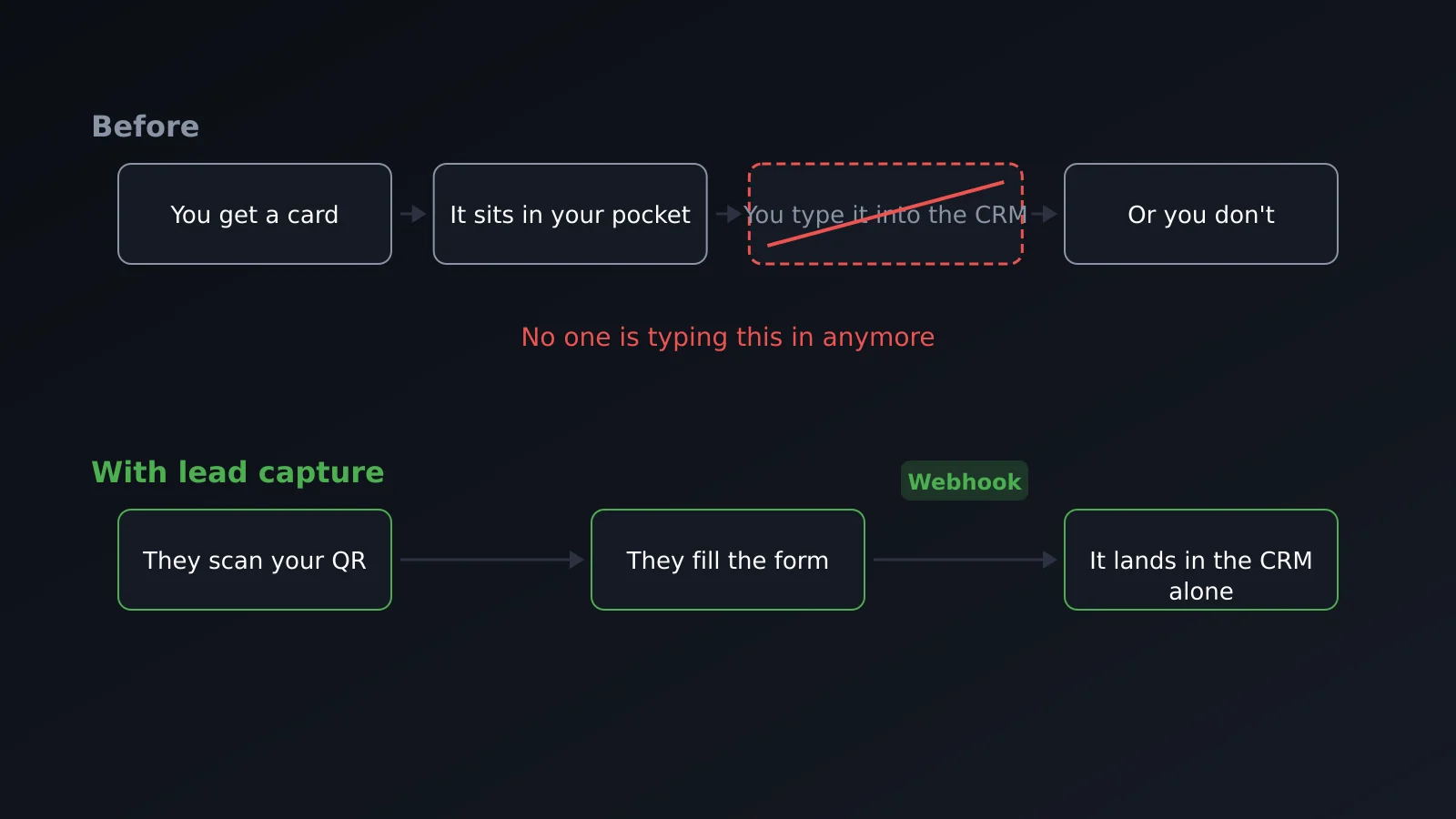
A sales rep hands out twenty cards at a trade show with no way to know which ones were looked at afterward. They collect prospect data in a notebook, or photograph someone else's card, and that photo sits in the phone camera roll until someone — usually the sales rep themselves, a month later — remembers to manually enter it into the CRM. When the prospect wants to reconnect three months later, they've lost the physical card and search for the company name on Google.
None of this is a design problem; it's what happens to the data between the handshake and the sales system. We cover this in general in what is a digital business card; here we focus on the specific case of a sales team.
The card as the gateway to your CRM
Webhooks: the lead arrives without anyone entering it manually
When a prospect fills out the capture form on a card — Pro plan or higher — that lead is saved in the dashboard. With webhook integration (Enterprise plan), it's also automatically sent to the tool your team already uses: the CRM, a spreadsheet, an automation flow. The HMAC signature on each submission verifies the data really comes from the card.
Without webhooks, the data stays in the dashboard and someone has to copy it to the CRM by hand, risking it won't arrive on time. With webhooks, the lead appears in the CRM the moment the prospect hits send, without anyone on the team touching it.
Scanning physical cards for the reverse flow
Follow-up works both ways: when a sales rep receives a paper card, they can photograph it from the app and the system extracts name, company, and contact via OCR instead of leaving it buried in the phone's camera roll. It doesn't replace human judgment — you should review the result before saving — but it avoids manual data entry.
Analytics as a signal of buying intent
A view counter tells a sales rep nothing. What matters is the pattern: if a prospect who visited your card three weeks ago opens it again today, that's buying intent, not curiosity. It's the signal that justifies a follow-up call without the prospect having to ask for one.
Advanced analytics, available in Pro plan and higher, shows where traffic comes from, what device is used, and how many visits ended in a saved contact or captured lead. That last data point separates a card that gets looked at from one that converts.
Widgets that shorten the sales cycle
Meeting booking built into the card itself
The Calendly widget integrated into the card eliminates one full step: instead of "I'll send you some time slots by email" and waiting for a reply, the prospect books directly from the link they already have open. It doesn't speed up the purchase decision, but it does cut the time between "I'm interested" and the next real conversation, which is where opportunities are lost to pure scheduling friction.
Catalog as PDF without "I'll email it to you"
The same with the catalog: a PDF download widget avoids the classic "I'll get that to you later" that often doesn't happen the same day, or gets buried in an overflowing inbox. The prospect gets it in the moment, from the same link they just scanned. The full list of widgets is on the features page.
One card per product line or vertical
A team selling multiple product lines, or serving different industries, shouldn't show the same generic card at every meeting. The plan lets you have multiple cards, each with its own URL, its own QR, and its own catalog or booking widget: one for industrial, another for retail, another for this quarter's trade show. Each carries the message of that conversation, instead of a one-size-fits-none profile.
Event Mode — a card tagged with the active event name — covers the specific case: a one-off trade show where you want to distinguish those leads from the rest of your pipeline without building a new card from scratch.
The team: consistent corporate profiles
With eight sales reps using eight different designs, the brand gets diluted. In the Enterprise plan, corporate profiles solve this: you define a profile once — colors, logo, structure — and apply it to the team's cards that use it, so a change propagates to all of them without entering card by card. The Team Dashboard, also Enterprise, gives overall visibility instead of isolated management per rep.
What a digital card doesn't do
We need to say this plainly: a digital card doesn't close deals. It doesn't convince anyone on its own, doesn't replace conversation or active follow-up by the sales rep, and doesn't fix a poorly defined sales process. It removes friction at three points: getting the data to the CRM without manual entry, leaving a trace of who looks again, and putting supporting materials one tap away instead of "I'll send it later." If the underlying process doesn't work, a better card won't fix it.
| Sales team need | What solves it | Plan |
|---|---|---|
| Form lead reaches CRM automatically | Webhooks with HMAC signature | Enterprise |
| Know if a prospect views the card again | Advanced analytics (visits, device, lead conversion) | Pro |
| Book the next meeting without email chains | Calendar widget (Calendly) | Pro |
| Deliver the catalog in the moment | PDF download widget | Pro |
| One card per product line or vertical | Multiple cards, each with its own URL and QR | Free / Pro / Enterprise (by limit) |
| Consistent brand across the sales team | Corporate profiles + Team Dashboard | Enterprise |
| Distinguish leads from a specific trade show | Event Mode | Pro / Enterprise |
Frequently asked questions
Does the whole sales team need the Enterprise plan?
Not to start. A solo sales rep can test the tool with lead capture and analytics on the Pro plan. Webhooks to the CRM and corporate profiles are Enterprise features that make sense when you have multiple reps sharing a brand and want leads to reach the same place without manual exports.
Does the prospect have to install anything to leave their data?
No. The capture form lives on the card's public page itself; it's filled from the mobile browser, with no app or prior registration needed. The same logic we covered in how to choose a digital business card: any friction added there translates to fewer captured leads.
Does it work if the sales cycle is short?
Less so. The value of reopen analytics and webhooks grows the longer the cycle, because there's more time between first contact and decision. If your sale closes in the same call, the real savings are more in the booking widget and on-hand catalog than in long-term follow-up.
Can I have a different card for each trade show?
Yes, two ways: create a new card with its own catalog widget, or activate Event Mode on an existing card to tag those leads as event-specific without duplicating anything.
What happens to the data the prospect leaves in the form?
It's saved like any captured lead, subject to the same data policy as the rest of your account. If you're capturing European contacts, it's worth reviewing form consent before activating it at a trade show with high visitor volume.
In summary
A digital card doesn't replace sales work. Properly connected to your team's other tools, it prevents prospect data from getting lost between the trade show and the CRM, turns a card reopen into an actionable signal, and puts the catalog or meeting one tap away instead of waiting on an email that sometimes never gets sent.
Create your card free and test the capture flow before deciding if you need webhooks or team profiles.