What is a digital business card and how does it work
A digital business card is a contact profile hosted on its own URL shared via QR code, NFC tag, or link. Here's what it does, how it differs from paper, and what to look for before choosing one.
July 13, 2026
6 min read
10 views

AI Summary
A digital business card is a contact profile hosted on its own URL shared via QR code, NFC tag, or link. Here's what it does, how it differs from paper, and what to look for before choosing one.
A digital business card is a contact profile hosted on its own web address, shared by displaying a QR code, tapping an NFC tag, or sending a link. When someone receives it, they open it in their browser without installing anything, and can save the contact to their phone in one tap. Unlike paper, it updates at any time, tracks how many people have opened it, and can collect data from visitors.
The fundamental difference isn't the format: it's that a paper card finishes its job the moment it changes hands, while a digital one starts there.
How it works, step by step
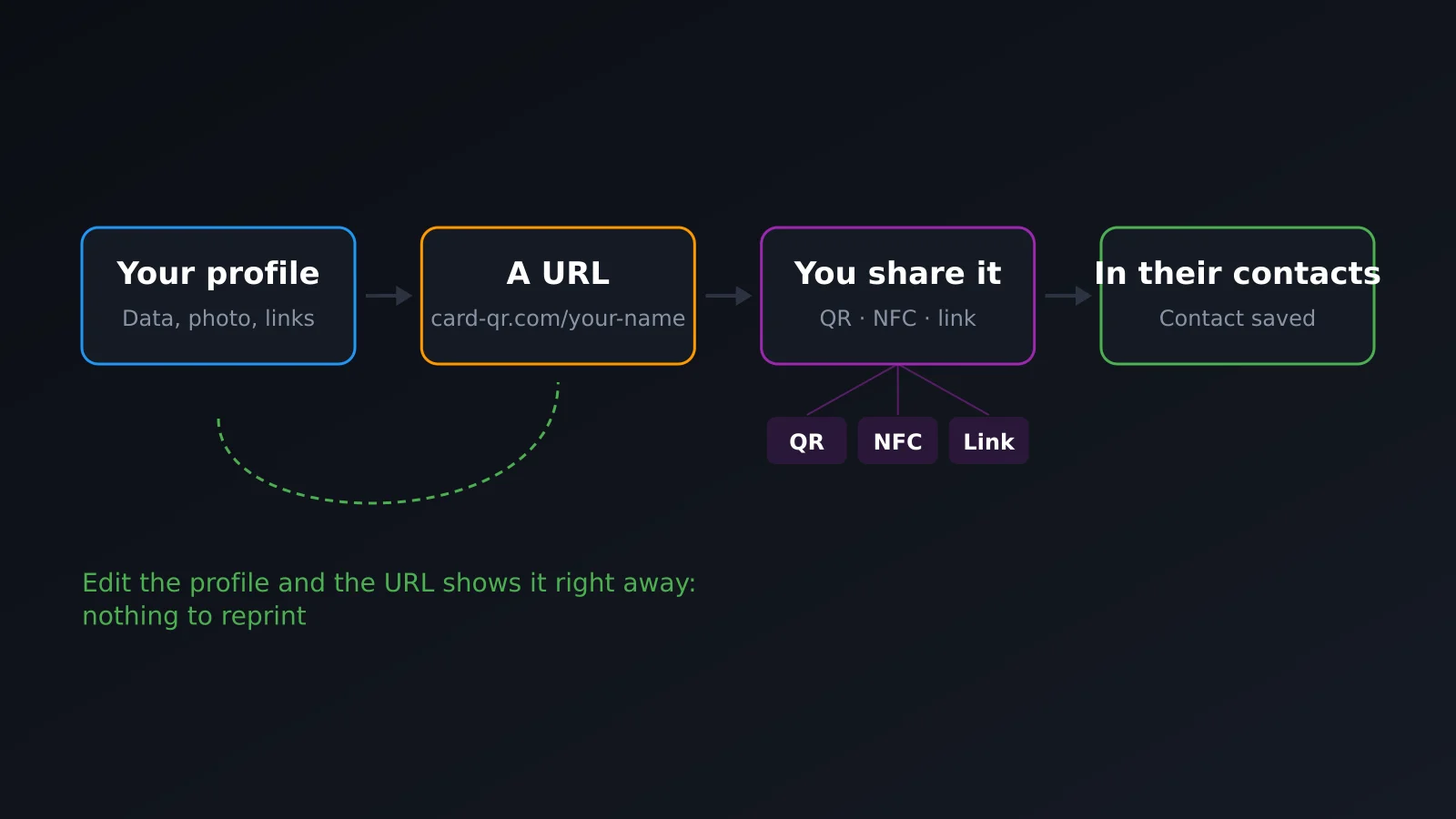
The mechanism is simpler than it seems:
- You create the profile. Name, job title, company, photo, phone, email, social media, website. This is what the other person will see.
- The system gives you a public URL. Something like
card-qr.com/c/your-name. That address is the card. - You share that URL. With a QR code the other person scans with their camera, with an NFC tag they just tap, or by pasting the link in a chat, email signature, or LinkedIn profile.
- The other person opens it and saves the contact. The save button generates a vCard file that the phone adds to contacts with all the information already filled in, no typing needed.
Neither person needs to have an app installed. A browser is all it takes, and every phone already has one.
QR or NFC: they're not the same
These are the two ways to share in person and they solve different situations.
| QR Code | NFC | |
|---|---|---|
| What the other person does | Opens camera and points | Taps their phone, that's it |
| Distance | Works from several meters away | Contact, less than 4 cm |
| Good for | Screen, poster, trade show booth, projected presentation | |
| Cost | Zero: it's just an image | The tag or card with chip |
| Weakness | Depends on lighting and scanner's steady hand | Older iPhones and some Android phones need an extra tap |
In practice they're used together: NFC when you're face to face, QR when you're on stage, on a screen, or at a distance. We cover this in detail in QR or NFC: which to use in each situation.
What a digital card can do that paper cannot
Fix it without throwing anything away
You change your phone number, job title, or company and edit your profile. Every card you've handed out, every QR code you've printed, and every NFC tag you've delivered still point to the same URL and show your new information. With paper, that same change means an entire box in the trash.
It tells you if it actually worked
A paper card leaves no trace: you hand out fifty and never know how many were actually read. A digital one records visits, what country and device they came from, and how many ended in a saved contact. That's the difference between thinking an event went well and knowing it did.
It captures data, not just delivers it
Paper is one-way: you give your information and wait. A digital card can include a contact capture form right on the public page, so whoever sees it can leave theirs too. That's the moment when a card stops being an introduction and becomes a sales tool.
It holds more than a rectangle
You can't fit a video, a PDF catalog, or a meeting booking link on an 85×55 mm rectangle. On a web page you can. Widgets (link buttons, booking calendar, video, PDF download) turn the card into the first step of a conversation, not the last.
What to look for before choosing one
- Multiple cards per person. The card you show at a business meeting isn't the same as the one you share at a tech conference. If the tool only allows one profile, you'll end up with a generic one that doesn't fit anywhere.
- What the free plan actually includes. Many services limit scans or expire after thirty days, forcing you to pay before you know if the product works for you.
- URL ownership. Check if you can use your own domain or choose your own URL slug. If your card lives forever at someone else's address, your brand is someone else's.
- What happens with the data. If you're capturing contacts in Europe, the form needs explicit consent and a real way to delete data. That's not a minor legal detail.
- Integration with your tools. Captured contacts should flow to your CRM automatically. If they can only be exported manually as a CSV, it's only a matter of time before you stop doing it.
Does it completely replace paper?
In most contexts, yes, and with advantages. In some—a very traditional industry, a country where card exchange is a social ritual, a meeting where nobody's going to pull out their phone—it makes sense to carry both: a physical card with a printed QR code or an NFC chip inside does both jobs at once. The object is still paper or plastic, but the content is now digital and editable.
Frequently asked questions
Does the person receiving the card need an app?
No. It opens in their phone's browser, like any web page. Neither the sender nor the receiver needs to install anything.
Does it work without internet?
You need a connection to view it the first time, because it's a web page. Once you've saved the contact to your phone, that data is stored there and doesn't depend on the network.
Can I have more than one card?
Yes, and it's recommended if you work in different contexts. Each card has its own URL and its own QR code, and you manage them all from the same account.
How much does it cost?
With CardQR, the free plan lets you create and share unlimited cards with no scan limits. Paid plans add contact capture, advanced analytics, a custom public URL slug, and API access. Pricing is on the plans page.
What happens if I stop paying?
It depends on the service, and it's worth asking before you start: with some providers, the card becomes inaccessible and every QR code you've handed out stops working. That's the biggest hidden risk in the category.
In summary
A digital business card solves three problems paper cannot: data expiring, not knowing if anyone actually looked at it, and exchange going only one way. If you're going to choose one, look beyond the design: check how it's shared, whether you can have multiple cards, who owns the URL, and what happens with contacts you capture.
Create your free card and see for yourself in five minutes.