Digital business card for trade shows and networking events: practical guide
How to prepare and use a digital business card at a trade show or conference: event-specific card, NFC at the booth, QR readable from a distance, lead capture in real-time, and follow-up without transcribing anything on Monday.
July 13, 2026
8 min read
0 views
AI Summary
How to prepare and use a digital business card at a trade show or conference: event-specific card, NFC at the booth, QR readable from a distance, lead capture in real-time, and follow-up without transcribing anything on Monday.
At a trade show or conference, a digital business card solves one concrete problem: the volume of contacts is high and you have seconds per contact, so any friction — searching for your phone, spelling out your email, promising "I'll send you my details later" — means half those conversations turn into nothing. The solution is to prepare an event-specific card in advance, with NFC for face-to-face interaction at the booth, a QR code designed to be read from a distance, and an active lead capture form from minute one, so what happens at the booth doesn't depend on someone remembering to write an email the following Thursday.
The problem has two sides and both hurt equally. You leave the trade show with seventy business cards in your pocket, you don't remember which booth each one came from, and transcribing them into your CRM on Monday is work almost nobody finishes — so a good portion gets lost without anyone deciding to lose it. And the other way around: the cards you hand out end up in the same forgotten pocket of someone else. The digital card doesn't fix anyone's lack of interest, but it eliminates the friction that turns real interest into a lost contact.
Before the event: prepare the card in the office, not at the booth
An event-specific card, not your everyday card
Your everyday card carries your title and usual information. The trade show version should also include context: which booth you're at, what you're presenting at this edition, and a direct link or widget to the catalog, demo, or offer for that event. Create a new card with its own URL instead of recycling the same one: that way its analytics speak only about the trade show.
The QR code in booth materials, not as a last-minute idea
The QR code on your event card needs to be printed before you leave the office: on the roll-up banner, on physical cards, on the counter. Download it in high resolution with time to spare — a pixelated QR code or one generated in a rush the night before is one of the reasons people don't bother scanning anything.
Activate lead capture before the event opens
Event Mode (Pro plan) and lead capture are activated from the dashboard, not from the booth with spotty event Wi-Fi. Check it the day before: the form is on, the fields you're asking for are the ones you'll actually use for follow-up, and consent is properly configured if you're collecting data from European visitors.
Checklist before heading to the event
- Event-specific card created, with its own widget or link to that edition's content
- QR code downloaded in high resolution and printed on roll-up banner, counter, and physical cards
- NFC tag or wristband programmed and tested on both Android and iPhone
- Lead capture form activated and tested from start to finish
- Final slide of your presentation (if applicable) with the event QR code, not just the company logo
During the event: make every second of conversation count
NFC for face-to-face interaction at the booth
When someone is already standing in front of you talking, NFC is faster than any QR code: bring your phone close to the tag and the card opens without needing a camera or framing. It's the natural gesture when there's already conversation — a handshake with data attached.
Large, visible QR code: on the booth panel and final slide
NFC covers face-to-face interaction, but at a booth most people walk past without stopping, and that's where the QR code on the panel is the only thing that captures anyone just looking from a distance. Same if you're giving a presentation: the final slide with the QR code is the last opportunity to turn the room's attention into a contact.
Capture form, in the moment — it's the only real opportunity
A trade show visitor isn't going to fill out a form when they get home: they'll do it at the booth, while interest is fresh, or they won't do it at all. That's why the form needs to be on the public card itself, in the same scan that shows your details, not in a separate step they have to find.
After the event: make sure the booth work doesn't get lost on Monday
Analytics by time slot: which days and times worked
Review the event card's analytics by hour and by day, not just the total. If Thursday afternoon brought triple the scans of the rest of the trade show, that tells you when it's worth having more people at the booth next time.
Leads to your CRM without manual transcription
Captured contacts should reach your CRM without anyone re-typing them by hand on Monday — that's exactly the step that gets skipped when there are seventy paper cards and one person to input them. With lead integration, that work doesn't depend on someone finding a free hour the following week.
Follow up while the prospect still remembers you
The first contact after the event should go out within two or three days, not two weeks later when they've already talked to fifteen other vendors and can't tell you apart from any of them. Order follow-ups by the date and time slot of the scan: whoever you talked to on day one, contact them before day two ends.
Common mistakes that cost you contacts at a booth
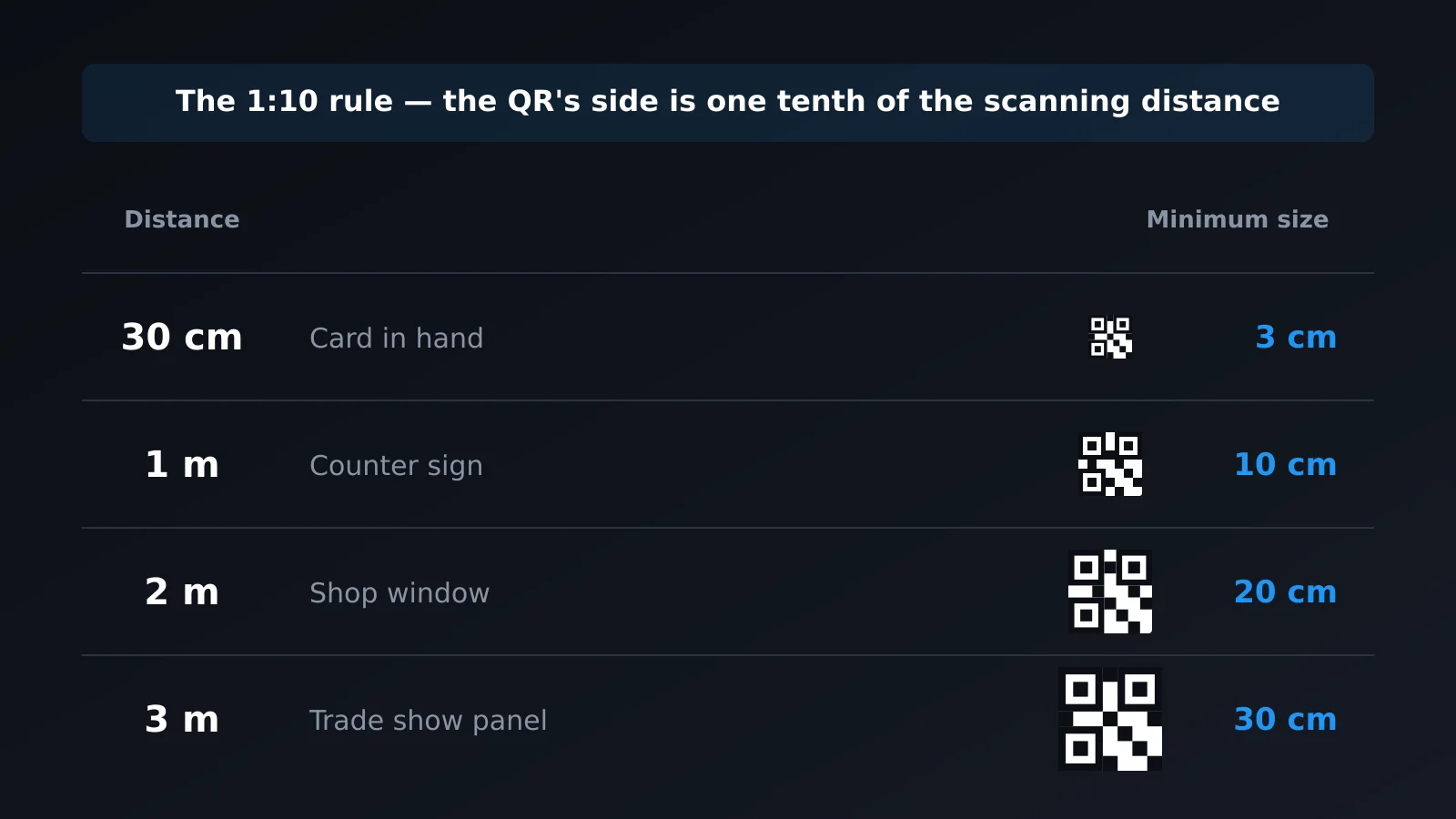
- QR code too small for the actual reading distance. A QR code designed to be viewed on a screen thirty centimeters away won't work on a panel seen from three meters. Its size should be proportional to the distance from which people will scan it, not the leftover space in your design.
- Relying only on NFC at a booth where most people walk past. NFC requires someone to stop and tap; in a busy corridor, much of your potential audience won't get close enough. Without a QR code visible from a distance, that foot traffic is completely lost.
- Arriving at the event without the card prepared. Improvising the QR code, NFC tag, or capture form the morning of the event — with saturated event Wi-Fi and no time — is the surest way something fails right when the most people are passing the booth.
Frequently asked questions
Do I need to create a new card for each event or can I reuse the same one?
It's best to create an event-specific card for important events. That way its analytics — scans, time slots, captured leads — speak only about that event, without mixing with your everyday card, and you can tailor the content to what's being discussed at that particular conference.
What size should the QR code on the booth panel be?
It depends on the distance from which people will view it, not how much space is left in your design. A QR code meant to be scanned from three meters away needs to be considerably larger than one on a card held in your hand — test it yourself with your phone from the actual distance before printing.
Does the lead capture form comply with GDPR if I'm collecting data at a European event?
The form includes explicit consent, and captured data is associated with your account with the same privacy management as the rest of your activity. Still, decide before the event what fields you'll ask for and why — asking only for what you need is also part of compliance.
What if there's poor coverage or Wi-Fi fails at the booth?
The public card and form are a web page: they need a connection. Test everything with mobile data before the event, not just office Wi-Fi, and always have the printed QR code as a backup.
Can I use NFC and QR code at the same booth without confusing visitors?
Yes, and it's worth combining them because they cover different situations: NFC for when someone is already standing in front of you talking, the large QR code on the panel for anyone just passing by without stopping. They don't compete; each covers the booth area where the other doesn't reach.
In summary
A trade show doesn't forgive friction: volume is high, you have seconds per contact, and there's no second chance with most people passing the booth. Prepare the event card before you leave the office, combine NFC for face-to-face with a QR code designed to be read from a distance, keep the capture form on during the entire event, and review analytics by time slot on Monday to see what actually worked.
Create your card free and prepare it before your next event.